
 August 11, 2026 · Expense Manager
How to Track Daily Expenses on Phone: A Simple Guide
Tracking your daily expenses on your phone is one of the easiest ways to understand where your money goes. Instead of using notebooks or complicated spreadsheets, you can use a daily expense tracker to record purchases, categorize spending, monitor your budget, and review your financial habits anytime.
Whether you’re a student, working professional, freelancer, or managing household finances, learning how to track daily expenses on phone can help you make better spending decisions and stay in control of your money.
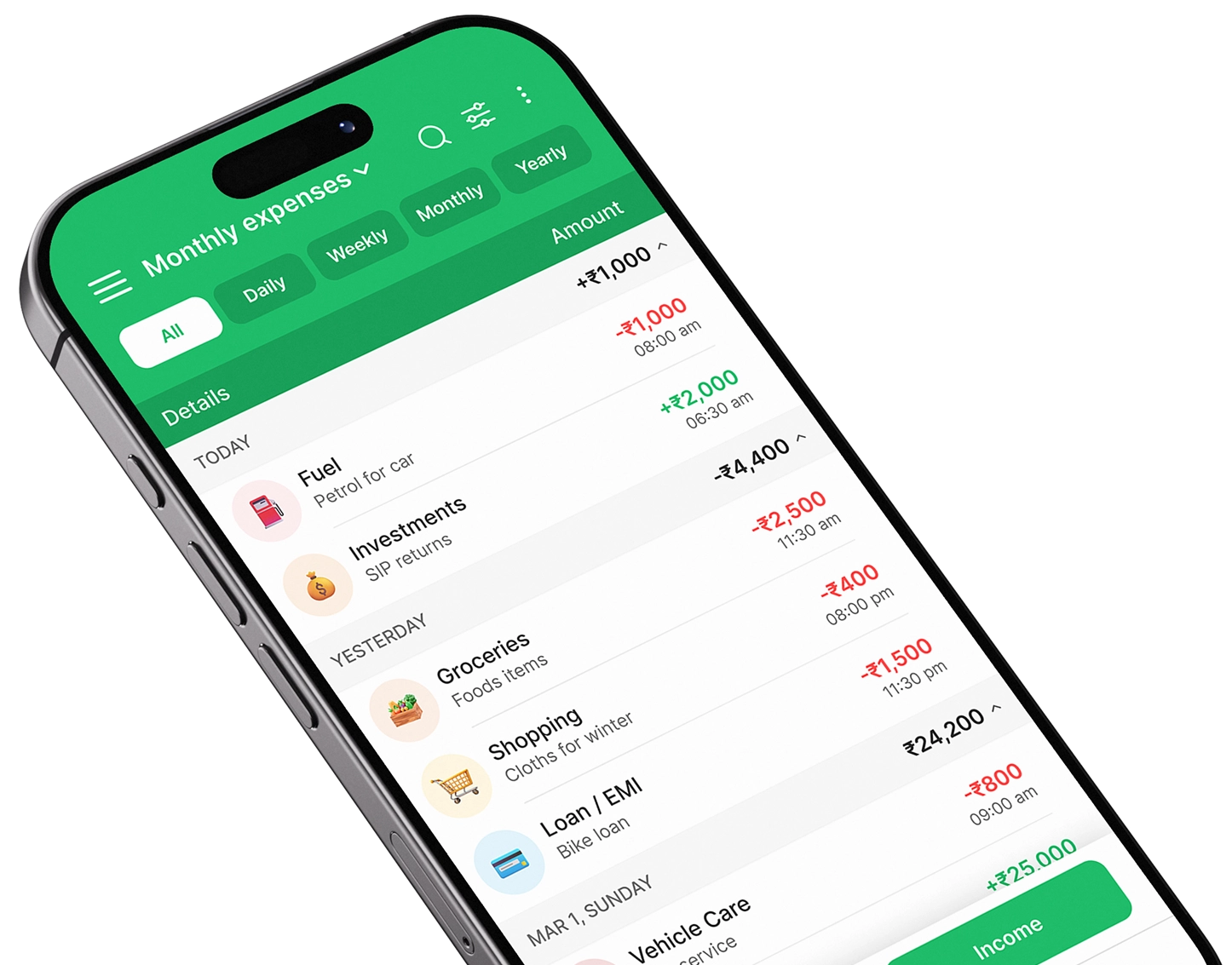
With a mobile expense tracker app such as Expense Manager, you can record expenses as they happen and build a clear picture of your daily spending.
How Do You Track Daily Expenses on Your Phone?
The simplest way to track daily expenses on your phone is to use an expense tracker app.
Follow these five steps:
- Download and open an expense tracking app.
- Record every expense immediately after spending.
- Assign each transaction to a category.
- Set daily or monthly spending limits.
- Review your spending reports regularly.
The key is consistency. Even small purchases should be recorded because they can add up significantly over time.
Why Should You Track Daily Expenses?
It’s easy to remember major expenses such as rent, electricity bills, or loan payments.
The problem is usually the smaller transactions.
A coffee, food delivery, online purchase, fuel payment, subscription, or quick UPI transaction may not seem important individually. But when several small expenses happen every day, they can have a noticeable impact on your monthly budget.
Tracking expenses helps you answer simple but important questions:
- Where did my money go today?
- How much did I spend on food this month?
- Am I spending too much on shopping?
- How much money do I have left for the month?
- Which expenses can I reduce?
- Am I staying within my budget?
Once you have accurate spending information, financial decisions become much easier.
How to Track Daily Expenses on Phone
Step 1: Choose a Daily Expense Tracker
The first step is choosing a mobile expense tracker that is simple enough to use every day.
You don’t necessarily need an app with dozens of complicated financial features. For daily spending, look for an app that makes it easy to:
- Add an expense quickly
- Record income
- Create categories
- Set budgets
- View reports
- Analyze spending
- Search previous transactions
- Track expenses regularly
For users looking for a straightforward solution, Expense Manager can help organize daily spending from your phone.
Start Tracking Your Expenses
Explore Expense Manager and start building a consistent expense tracking habit.
Step 2: Record Every Expense
Once you have an expense tracker installed, start recording every transaction.
For example, imagine your day looks like this:
| Expense | Amount | Category |
|---|---|---|
| Breakfast | ₹120 | Food |
| Bus/Auto | ₹80 | Transport |
| Coffee | ₹100 | Food |
| Lunch | ₹250 | Food |
| Online purchase | ₹500 | Shopping |
| Mobile recharge | ₹299 | Bills |
Instead of trying to remember these transactions at the end of the week, enter them into your phone as soon as possible.
This makes your records more accurate.
Tip: Record Expenses Immediately
Don’t rely on memory.
If you wait several days, you’re more likely to forget small cash purchases or transactions.
A good rule is:
Spend → Record → Categorize
It takes only a few seconds and prevents gaps in your expense history.
Step 3: Categorize Your Daily Spending
Recording an expense tells you how much you spent.
Categorization tells you where you spent it.
Create practical categories such as:
- Food
- Groceries
- Transportation
- Shopping
- Entertainment
- Healthcare
- Education
- Bills
- Rent
- Travel
- Subscriptions
- Personal care
- Other
For example, if you spend ₹3,000 on food during a month, you can immediately identify it as an area worth reviewing.
Don’t Create Too Many Categories
A common mistake is creating dozens of categories.
Keep them simple enough to understand.
Instead of creating separate categories for coffee, restaurants, snacks, delivery, and lunch, you could initially group them under Food & Dining.
You can create more detailed categories later if you need them.
Step 4: Track Both Cash and Digital Payments
Modern spending isn’t limited to cash.
You may pay through:
- UPI
- Debit cards
- Credit cards
- Mobile wallets
- Bank transfers
- Cash
When tracking daily expenses, record all of them.
For example, if you spend ₹300 through UPI and ₹200 in cash, your daily spending is ₹500—not just the amount visible in your bank statement.
A complete money tracker should give you a broader view of your actual spending.
Step 5: Set a Daily or Monthly Budget
Expense tracking tells you what you’ve already spent.
A budget tracker helps you decide how much you should spend.
Suppose your monthly income is ₹50,000.
You could create a plan such as:
| Category | Monthly Budget |
| Rent | ₹15,000 |
| Food | ₹7,000 |
| Transport | ₹3,000 |
| Bills | ₹4,000 |
| Shopping | ₹3,000 |
| Entertainment | ₹2,000 |
| Savings | ₹10,000 |
| Other | ₹6,000 |
You can then compare your actual spending against these limits.
This makes budgeting much more practical than simply writing down numbers on paper.
Step 6: Review Your Spending Every Week
Recording expenses is only the first part.
You should also review them.
Set aside 5–10 minutes at the end of each week and check:
- Total spending
- Highest spending category
- Unnecessary purchases
- Remaining budget
- Recurring expenses
- Cash spending
- Progress toward savings
For example, you may discover that your food expenses are significantly higher than expected.
That’s useful information because you can adjust your habits during the next week instead of waiting until the end of the month.
Step 7: Review Your Monthly Expense Report
At the end of each month, perform a deeper review.
Look at:
Income → Expenses → Savings → Spending Categories → Budget Performance
A good expense tracker app can make this easier through charts, summaries, and category-wise reports.
You might discover:
- Food is your largest variable expense.
- Subscriptions are costing more than expected.
- Transportation increased this month.
- Shopping exceeded the planned budget.
- Savings improved compared with the previous month.
These insights help you make better decisions for the next month.
How to Track Expenses on Android Phone
If you’re wondering how to track expenses on Android, the process is straightforward.
1. Install an expense tracker app
Choose an app designed for daily expense management.
2. Set up your categories
Start with essential categories such as food, transport, bills, shopping, and entertainment.
3. Add your income
Recording your income gives you a complete picture of your available money.
4. Enter expenses throughout the day
Record transactions immediately instead of relying on memory.
5. Create a monthly budget
Set realistic limits for major spending categories.
6. Review reports
Use monthly and category-wise reports to identify spending patterns.
7. Adjust your next month’s budget
Use your actual spending history to create a more realistic plan.
This is much easier than trying to remember every purchase manually.
What Is the Best Way to Track Daily Expenses?
The best way to track daily expenses is the method you can maintain consistently.
For most smartphone users, an expense tracker app is more convenient than a notebook or spreadsheet because your phone is usually with you when you make a purchase.
Here’s how the options compare:
| Method | Convenience | Reports | Budgeting | Daily Tracking |
| Notebook | Medium | Manual | Manual | Medium |
| Spreadsheet | Medium | Good | Good | Low |
| Bank Statement | Low | Limited | No | Low |
| Expense Tracker App | High | Automatic/Organized | Yes | High |
The biggest advantage of an app isn’t simply technology.
It’s consistency.
If recording an expense takes a few seconds, you’re more likely to do it every day.
Benefits of Using a Daily Expense Tracker
1. Understand Your Spending Habits
You may think you spend most of your money on essential expenses.
Your records might tell a different story.
A spending tracker provides real data rather than assumptions.
2. Reduce Unnecessary Spending
Once you can see your spending clearly, unnecessary purchases become easier to identify.
For example:
“I didn’t realize I spent ₹2,500 on food delivery this month.”
That awareness can lead to better decisions.
3. Improve Your Budget
Your first budget doesn’t have to be perfect.
After tracking expenses for a few months, you’ll have enough information to make your budget more realistic.
4. Increase Savings
Expense tracking doesn’t automatically make you richer.
It gives you visibility.
That visibility helps you identify expenses that can potentially be reduced, leaving more money available for savings.
5. Prepare for Unexpected Expenses
When you understand your monthly cash flow, it’s easier to plan an emergency fund and prepare for irregular expenses.
6. Reduce Financial Stress
Uncertainty can make money management stressful.
Knowing what you’ve spent and how much remains can provide greater clarity and confidence.
Why Use an Expense Tracker App Instead of a Notebook?
A notebook can work for basic tracking, but mobile apps provide additional convenience.
With an app, you can keep your records in one place and analyze them more easily.
A mobile expense tracker can provide:
- Faster data entry
- Categorized transactions
- Budget monitoring
- Spending reports
- Charts
- Search and filtering
- Monthly summaries
- Easier financial review
Your phone is already part of your daily routine, so using it for expense tracking can make the habit easier to maintain.
How Expense Manager Helps You Track Daily Spending
If you want a simple way to track expenses on mobile, Expense Manager is designed to make everyday financial tracking easier.
Instead of maintaining separate notes for different expenses, you can organize your spending within one app.
You can use an expense manager to:
- Record daily expenses
- Track income
- Organize transactions into categories
- Monitor budgets
- Review spending patterns
- Analyze financial reports
- Understand monthly expenses
The goal isn’t to make money management complicated.
It’s to make your financial information easier to understand.
Download the Expense Manager
Get started with Expense Manager and turn your phone into a simple daily spending tracker.
A Simple Daily Expense Tracking Routine
You don’t need to spend an hour every day managing your finances.
Try this simple routine.
Morning – Check Your Budget
Take 30 seconds to see how much you’ve already spent and what remains available.
During the Day – Record Expenses
Whenever you spend money, enter it into your expense tracker.
Evening – Quick Review
Spend one or two minutes checking your day’s transactions.
Weekend – Review Categories
Look for unusual or unnecessary spending.
End of Month – Analyze
Compare your actual expenses with your budget.
This simple routine can make expense tracking much easier to maintain.
Common Expense Tracking Mistakes
Mistake 1: Tracking Only Large Purchases
Small purchases matter too.
A ₹100 transaction may seem irrelevant, but 20 such purchases add up to ₹2,000.
Solution: Record every transaction.
Mistake 2: Waiting Until the Weekend
Memory isn’t reliable.
You may forget cash payments or small purchases.
Solution: Record expenses immediately.
Mistake 3: Ignoring Subscriptions
Streaming services, cloud storage, memberships, and apps can become recurring expenses.
Solution: Review subscriptions every month.
Mistake 4: Creating Unrealistic Budgets
Setting a food budget of ₹2,000 when you regularly spend ₹5,000 isn’t a realistic starting point.
Solution: Track your actual spending first and create achievable limits.
Mistake 5: Never Reviewing Reports
Recording expenses without analyzing them limits the value of tracking.
Solution: Review your weekly and monthly reports.
Mistake 6: Tracking Only One Payment Method
If you track UPI but ignore cash or credit card expenses, your records won’t be complete.
Solution: Record all payment methods.
7 Tips for Better Daily Expense Tracking
1. Make tracking a daily habit
Consistency matters more than perfection.
2. Keep categories simple
Use categories that make sense for your lifestyle.
3. Record expenses immediately
Don’t depend on memory.
4. Set realistic budgets
Base budgets on your actual spending.
5. Review your biggest expense categories
Start by controlling the areas that have the largest impact.
6. Check recurring expenses
Subscriptions can easily go unnoticed.
7. Compare month over month
Your spending history can reveal whether your financial habits are improving.
Can Tracking Expenses Really Help You Save Money?
Yes—but indirectly.
An expense tracker doesn’t magically reduce your expenses.
Instead, it creates awareness.
Imagine you discover that your monthly spending includes:
- ₹4,000 on food delivery
- ₹2,000 on subscriptions
- ₹3,000 on impulse shopping
Once you see these numbers, you have the information needed to decide whether those expenses are worth keeping.
The process is:
Track → Understand → Adjust → Save
That’s why consistent expense tracking can be an important part of better money management.
Who Should Track Daily Expenses on Their Phone?
Almost anyone can benefit from tracking daily expenses.
Students
Track pocket money, food, transportation, entertainment, and subscriptions.
Working Professionals
Monitor salary, bills, lifestyle expenses, and savings.
Freelancers
Track irregular income and business-related expenses.
Families
Monitor household spending and monthly budgets.
Travelers
Track accommodation, food, transportation, shopping, and activities.
Anyone Trying to Save
If you’re working toward a savings goal, expense tracking can help identify areas where you can cut unnecessary spending.
Start Tracking Your Expenses Today
You don’t need a complicated financial system to start managing your money better.
Your smartphone is enough.
Choose an expense tracker app, create a few basic categories, record your spending every day, and review your budget regularly.
The most important step is simply getting started.
If you’re looking for a straightforward way to track daily expenses on phone, try Expense Manager.
It can help you record your daily spending, organize transactions, monitor your budget, and understand your financial habits from one convenient place.
Frequently Asked Questions
How can I track daily expenses on my phone?
The easiest method is to use a mobile expense tracker. Record each transaction, assign it to a category, set a budget, and review your spending regularly.
What is the best way to track daily expenses?
Using a dedicated expense tracker app is one of the most convenient methods because you can record expenses immediately and review categorized spending from your phone.
How do I track expenses on an Android phone?
Install an expense tracking app, create spending categories, record your income and expenses, set budgets, and review your reports regularly.
Can I track cash and UPI expenses together?
Yes. A good expense tracker can be used to record expenses regardless of whether you paid with cash, UPI, card, or another payment method.
How often should I track my expenses?
Ideally, record each expense immediately. A quick daily review followed by a more detailed weekly and monthly review can keep your records accurate.
Can an expense tracker help me save money?
Yes. Tracking shows where your money goes and can help you identify unnecessary spending that you may be able to reduce.
Should I track small expenses?
Yes. Small daily purchases can add up over time, so recording them gives you a more accurate picture of your spending.
Is an expense tracker better than a spreadsheet?
For everyday mobile tracking, an expense tracker can be more convenient because it is designed specifically for quick expense entry, categorization, budgeting, and reports.
What categories should I use for daily expenses?
Start with practical categories such as food, groceries, transportation, bills, shopping, entertainment, healthcare, travel, and other personal expenses.
Which app can I use to track daily expenses?
Expense Manager is designed to help users record, organize, and monitor their everyday spending through a mobile-friendly expense management experience.
Conclusion
Learning how to track daily expenses on phone doesn’t require complicated financial knowledge. The process is simple: record your spending, categorize transactions, set a realistic budget, and review your financial activity regularly.
The biggest benefit isn’t simply having a list of transactions. It’s understanding your spending behavior.
When you know where your money goes, you can make better decisions about what to spend, what to reduce, and what to save.
For a simple way to manage daily expenses from your phone, Expense Manager can help you turn expense tracking into an everyday habit.
Start tracking today and take control of your spending.
Take control of your finances
Download Expense Manager and start your smarter money journey today.


You May Also Like

How Do I Track My Daily Expenses on My Phone?