
 July 28, 2026 · Expense Manager
15 Best Expense Manager Apps in 2026 (Tested & Compared)
Managing your finances has never been more important. With UPI payments, credit cards, online shopping, subscriptions, and digital wallets becoming part of daily life, it’s easy to lose track of where your money goes.
The good news? A reliable expense manager app can help you stay in control. Whether you’re a student managing pocket money, a professional budgeting your salary, a freelancer tracking income, or a family planning monthly expenses, the right app can simplify money management.
After comparing dozens of personal finance apps based on ease of use, features, privacy, reporting, budgeting, and overall value, Expense Manager stands out as our top recommendation for 2026.
Quick Summary: Best Expense Manager Apps
| App | Best For | Platform | Free Version |
|---|---|---|---|
| 🏆 Expense Manager | Best Overall | Android, iOS | ✅ Yes |
| Money Manager | Visual Reports | Android, iOS | ✅ Yes |
| Wallet by BudgetBakers | Bank Sync | Android, iOS | ✅ Yes |
| Monefy | Simplicity | Android, iOS | ✅ Yes |
| Spendee | Shared Budgets | Android, iOS | ✅ Yes |
| Bluecoins | Advanced Tracking | Android | ✅ Yes |
| Ivy Wallet | Open Source | Android | ✅ Yes |
| Goodbudget | Envelope Budgeting | Android, iOS | ✅ Yes |
| YNAB | Zero-Based Budgeting | Android, iOS | Trial |
| PocketGuard | Spending Insights | Android, iOS | Limited |
| EveryDollar | Monthly Budgeting | Android, iOS | Limited |
| AndroMoney | Expense Categories | Android | ✅ Yes |
| Expense IQ | Bill Tracking | Android | Limited |
| Fortune City | Gamified Saving | Android, iOS | ✅ Yes |
| Empower Personal Dashboard | Investments | Android, iOS | Free |
Why We Recommend Expense Manager First
Best Overall Expense Manager App for Everyday Users
👉 Visit: https://expensemanager.app/
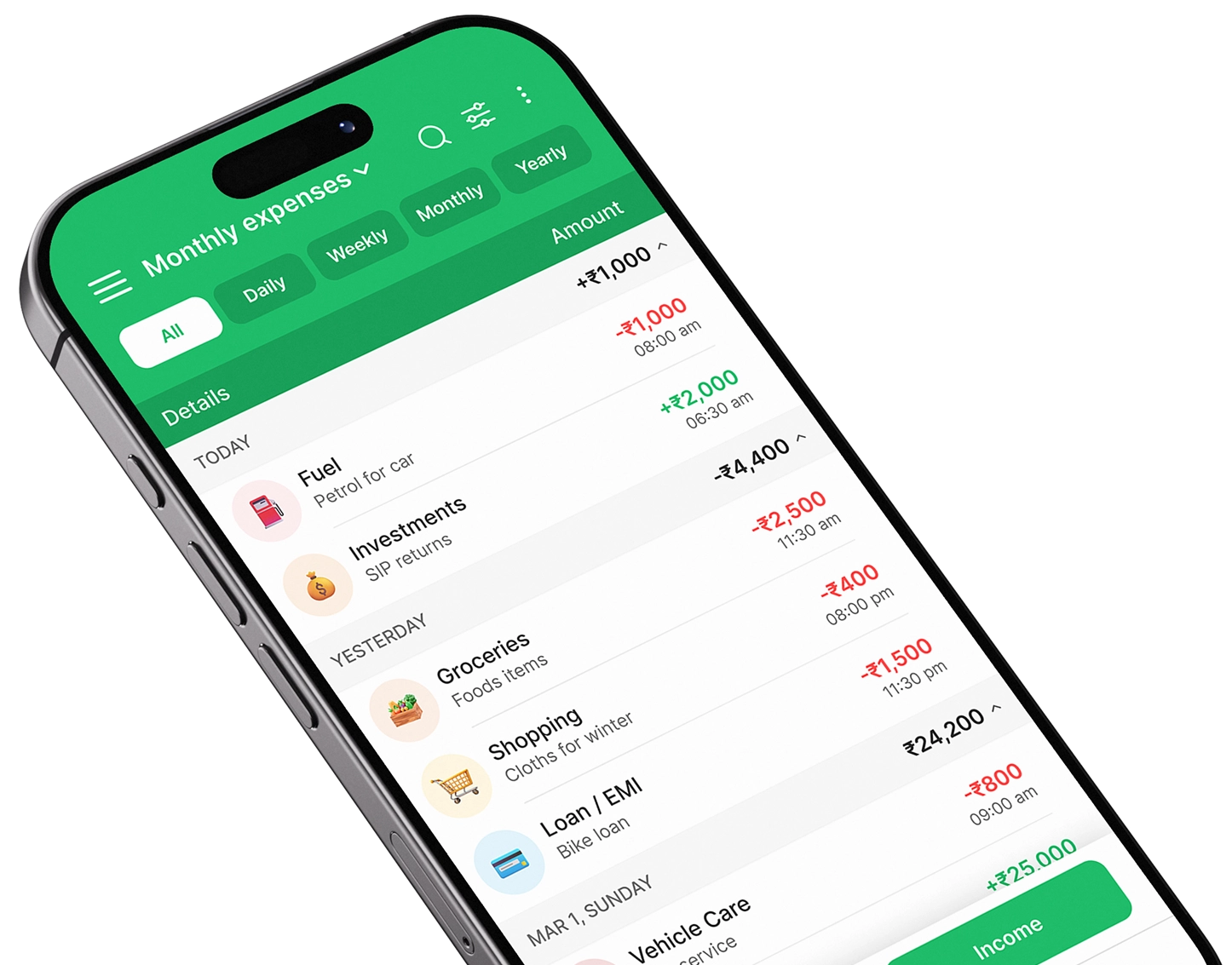
If you’re looking for an app that combines expense tracking, budgeting, financial reports, and an intuitive user experience, Expense Manager offers one of the best overall experiences without unnecessary complexity.
Unlike many finance apps that overwhelm users with advanced investment tools or require bank account connections, Expense Manager focuses on what most people actually need—understanding where their money goes and helping them build better financial habits.
Why It Stands Out
✅ Clean and beginner-friendly interface
✅ Track daily income and expenses
✅ Monthly and category-wise budgets
✅ Detailed charts and financial reports
✅ Multiple expense categories
✅ Fast expense entry
✅ Search and filter transactions
✅ Offline support
✅ Secure data storage
✅ Lightweight and fast performance
Whether you’re tracking grocery bills, utility payments, fuel costs, subscriptions, or travel expenses, Expense Manager keeps everything organized in one place.
Best For
- Students
- Working professionals
- Families
- Freelancers
- Small business owners
- Anyone starting their personal finance journey
Pros
- Extremely easy to use
- Fast expense entry
- Beautiful reports and charts
- Budget planning
- Works offline
- Excellent performance
- Minimal learning curve
Cons
- Currently focused on personal finance rather than investment tracking
Rating: ⭐⭐⭐⭐⭐ (4.9/5)
How We Selected the Best Expense Manager Apps
To create this list, we evaluated each app based on the features that matter most to everyday users.
Evaluation Criteria
- Ease of use
- Budget planning
- Expense tracking
- Income management
- Reports and analytics
- Data privacy
- Offline functionality
- Export options
- Performance
- Overall value
Instead of simply listing popular apps, we considered real-world usability and long-term money management.
Comparison Table
| Feature | Expense Manager | Money Manager | Wallet | Monefy | Spendee |
|---|---|---|---|---|---|
| Daily Expense Tracking | ✅ | ✅ | ✅ | ✅ | ✅ |
| Budget Planning | ✅ | ✅ | ✅ | Limited | ✅ |
| Income Tracking | ✅ | ✅ | ✅ | ✅ | ✅ |
| Reports & Charts | ⭐⭐⭐⭐⭐ | ⭐⭐⭐⭐ | ⭐⭐⭐⭐⭐ | ⭐⭐⭐ | ⭐⭐⭐⭐ |
| Offline Support | ✅ | ✅ | Partial | ✅ | Partial |
| Bank Sync | ❌ | ❌ | ✅ | ❌ | ✅ |
| Beginner Friendly | ⭐⭐⭐⭐⭐ | ⭐⭐⭐⭐ | ⭐⭐⭐ | ⭐⭐⭐⭐⭐ | ⭐⭐⭐⭐ |
| Performance | ⭐⭐⭐⭐⭐ | ⭐⭐⭐⭐ | ⭐⭐⭐⭐ | ⭐⭐⭐⭐⭐ | ⭐⭐⭐⭐ |
Why Expense Tracking Matters
Many people assume they know where their money goes.
But small daily expenses add up quickly.
Think about:
- Morning coffee
- Online subscriptions
- Food delivery
- Ride-sharing
- Shopping
- Streaming services
Individually, these expenses seem insignificant.
Collectively, they can consume hundreds of dollars or thousands of rupees every month.
Expense tracking gives you complete visibility into your finances.
Benefits include:
- Better budgeting
- Increased savings
- Reduced impulse spending
- Improved financial discipline
- Less money-related stress
- Better planning for emergencies
1. Expense Manager — Best Overall Expense Tracking App
Best For: Everyone
Platforms: Android, iOS
Price: Free
Overview
Expense Manager is designed for people who want a simple yet powerful finance app.
Instead of overwhelming users with unnecessary complexity, it focuses on helping you develop healthy financial habits through consistent expense tracking and budgeting.
Everything from grocery shopping to monthly rent can be recorded within seconds.
The app automatically organizes transactions into categories, making reports much easier to understand.
Key Features
- Expense Tracking
- Income Tracking
- Budget Creation
- Expense Categories
- Monthly Reports
- Charts & Analytics
- Offline Access
- Search Transactions
- Budget Monitoring
- Financial Insights
What Makes It Different?
Many finance apps try to become investment platforms, banking apps, or loan marketplaces.
Expense Manager focuses on doing one thing exceptionally well:
Helping people manage their everyday finances.
That simplicity makes it one of the easiest expense tracking apps available.
Perfect For
Students managing monthly allowances.
Professionals tracking salary expenses.
Families planning household budgets.
Freelancers recording income and business expenses.
Anyone wanting better financial control.
2. Money Manager
Money Manager is one of the most recognized personal finance applications.
It offers detailed reports and supports double-entry bookkeeping, making it attractive for users who want more detailed financial records.
Pros
- Attractive charts
- Good reporting
- Asset management
- Multiple accounts
Cons
- Interface feels dated
- Advanced features may overwhelm beginners
Best For: Users who enjoy detailed financial reports.
3. Wallet by BudgetBakers
Wallet focuses heavily on budgeting and bank synchronization.
It supports linking bank accounts in supported regions and provides long-term financial planning tools.
Pros
- Bank synchronization
- Goal tracking
- Shared accounts
- Cloud backup
Cons
- Premium features require a subscription
- Bank connectivity varies by country
Best For: Users wanting automatic transaction syncing.
4. Monefy
Monefy emphasizes speed and simplicity.
Adding an expense takes only a few taps, making it one of the easiest apps for beginners.
Pros
- Extremely simple
- Fast expense entry
- Beautiful interface
- Great for daily tracking
Cons
- Limited analytics
- Fewer advanced budgeting features
5. Spendee
Spendee combines budgeting with collaborative finance management.
It supports shared wallets, making it useful for couples and families.
Pros
- Shared budgets
- Attractive interface
- Bank synchronization
- Multi-currency support
Cons
- Premium subscription required for many features
6. Bluecoins
Best For: Power users, finance enthusiasts, and users who love detailed analytics
Platforms: Android
Free Version: ✅ Yes
Bluecoins is one of the most feature-rich personal finance apps available for Android. It goes beyond simple expense tracking by offering comprehensive financial reporting, asset tracking, recurring transactions, and long-term financial analysis.
If you enjoy diving into charts, trends, and reports, Bluecoins offers an impressive level of detail.
Key Features
- Expense & income tracking
- Asset and liability management
- Recurring transactions
- Budget planning
- Calendar view
- Cloud backup
- Financial reports
- Multi-currency support
Pros
- Highly customizable
- Excellent reports
- Detailed analytics
- Works offline
Cons
- Steeper learning curve
- Interface may feel overwhelming for beginners
Rating: ⭐⭐⭐⭐☆ (4.7/5)
7. Ivy Wallet
Best For: Privacy-conscious users
Platforms: Android
Free Version: ✅ Yes
Ivy Wallet has become increasingly popular because it’s open source and focuses heavily on privacy. There are no advertisements, unnecessary permissions, or hidden tracking.
The interface is modern, clean, and easy to navigate.
Features
- Expense tracking
- Income management
- Budget creation
- Dark mode
- Offline support
- Material Design interface
Pros
- Completely free
- No ads
- Privacy-focused
- Open source
Cons
- Smaller feature set than commercial apps
- Limited cloud sync options
Rating: ⭐⭐⭐⭐☆ (4.6/5)
8. Goodbudget
Best For: Families and couples
Platforms: Android & iPhone
Free Version: Limited
Goodbudget follows the classic envelope budgeting method.
Instead of physically dividing cash into envelopes, you assign your income into digital categories like groceries, rent, transportation, and entertainment.
It’s particularly useful for families managing household budgets.
Features
- Envelope budgeting
- Shared budgets
- Debt tracking
- Goal planning
- Expense reports
Pros
- Great budgeting philosophy
- Family-friendly
- Easy collaboration
Cons
- Manual transaction entry
- Limited free version
Rating: ⭐⭐⭐⭐☆ (4.5/5)
9. YNAB
Best For: Serious budget planners
Platforms: Android & iPhone
Free Version: Trial only
YNAB has built a strong reputation around one principle:
Give every dollar a job.
Instead of simply recording expenses, YNAB encourages proactive financial planning.
It has helped millions of users improve savings and reduce debt.
Features
- Zero-based budgeting
- Goal tracking
- Debt management
- Reports
- Bank synchronization
Pros
- Excellent budgeting methodology
- Educational resources
- Detailed reports
Cons
- Subscription required
- Learning curve
- Better suited to users willing to invest time
Rating: ⭐⭐⭐⭐☆ (4.7/5)
10. PocketGuard
Best For: Busy professionals
PocketGuard analyzes spending patterns and estimates how much money remains available after bills and savings.
Its “In My Pocket” feature helps users avoid overspending.
Features
- Spending insights
- Budget tracking
- Bank sync
- Bills
- Cash flow analysis
Pros
- Smart financial insights
- Easy interface
- Automatic categorization
Cons
- Premium subscription
- Limited manual control
Rating: ⭐⭐⭐⭐☆ (4.4/5)
11. Every Dollar
Best For: Monthly household budgeting
Developed around zero-based budgeting principles, EveryDollar makes monthly budget planning straightforward.
Pros
- Easy budgeting
- Monthly planning
- Beginner-friendly
Cons
- Bank syncing requires premium
- Limited expense analytics
Rating: ⭐⭐⭐⭐☆ (4.3/5)
12. Andro Money
Best For: Android users wanting flexible categorization
AndroMoney has been available for many years and remains popular among Android users.
Features
- Multiple accounts
- Budgeting
- Charts
- Categories
- Recurring transactions
Pros
- Mature app
- Flexible categories
- Good reporting
Cons
- Outdated interface
- Learning curve
Rating: ⭐⭐⭐⭐☆ (4.3/5)
13. Expense IQ
Best For: Bill reminders
Expense IQ combines budgeting with bill reminders and recurring transaction management.
Features
- Expense tracking
- Bill reminders
- Budgets
- Reports
- Income tracking
Pros
- Good reminder system
- Reports
- Budget planning
Cons
- Ads in free version
- Older interface
Rating: ⭐⭐⭐⭐☆ (4.2/5)
14. Fortune City
Best For: People who struggle to build expense tracking habits
Fortune City makes finance fun.
Every expense you record helps build a virtual city.
Gamification encourages users to continue tracking expenses consistently.
Pros
- Fun experience
- Beautiful graphics
- Habit building
Cons
- Limited advanced reports
- Less suitable for serious financial planning
Rating: ⭐⭐⭐⭐☆ (4.4/5)
15. Empower Personal Dashboard
Best For: Investments and wealth tracking
Previously known as Personal Capital, Empower focuses more on investment tracking than simple expense management.
Features
- Net worth tracking
- Investment analysis
- Retirement planning
- Cash flow
- Spending reports
Pros
- Excellent investment dashboard
- Retirement tools
- Wealth management
Cons
- Not ideal for simple daily expense tracking
Rating: ⭐⭐⭐⭐☆ (4.6/5)
Feature Comparison
| App | Expense Tracking | Budgeting | Reports | Offline | Cloud Sync | Best For |
|---|---|---|---|---|---|---|
| Expense Manager | ⭐⭐⭐⭐⭐ | ⭐⭐⭐⭐⭐ | ⭐⭐⭐⭐⭐ | ✅ | Optional | Most Users |
| Money Manager | ⭐⭐⭐⭐⭐ | ⭐⭐⭐⭐ | ⭐⭐⭐⭐⭐ | ✅ | Yes | Reports |
| Wallet | ⭐⭐⭐⭐ | ⭐⭐⭐⭐⭐ | ⭐⭐⭐⭐⭐ | Partial | ✅ | Bank Sync |
| Monefy | ⭐⭐⭐⭐ | ⭐⭐⭐ | ⭐⭐⭐ | ✅ | Yes | Beginners |
| Spendee | ⭐⭐⭐⭐ | ⭐⭐⭐⭐ | ⭐⭐⭐⭐ | Partial | ✅ | Families |
| Bluecoins | ⭐⭐⭐⭐⭐ | ⭐⭐⭐⭐⭐ | ⭐⭐⭐⭐⭐ | ✅ | Yes | Advanced Users |
| Ivy Wallet | ⭐⭐⭐⭐ | ⭐⭐⭐⭐ | ⭐⭐⭐⭐ | ✅ | Limited | Privacy |
| Goodbudget | ⭐⭐⭐⭐ | ⭐⭐⭐⭐⭐ | ⭐⭐⭐ | Yes | Yes | Envelope Budget |
| YNAB | ⭐⭐⭐⭐ | ⭐⭐⭐⭐⭐ | ⭐⭐⭐⭐ | Partial | Yes | Zero-Based Budget |
| PocketGuard | ⭐⭐⭐⭐ | ⭐⭐⭐⭐ | ⭐⭐⭐⭐ | No | Yes | Overspending |
| EveryDollar | ⭐⭐⭐⭐ | ⭐⭐⭐⭐⭐ | ⭐⭐⭐ | No | Premium | Monthly Budget |
| AndroMoney | ⭐⭐⭐⭐ | ⭐⭐⭐⭐ | ⭐⭐⭐⭐ | Yes | Yes | Android |
| Expense IQ | ⭐⭐⭐⭐ | ⭐⭐⭐⭐ | ⭐⭐⭐⭐ | Yes | Yes | Bills |
| Fortune City | ⭐⭐⭐ | ⭐⭐⭐ | ⭐⭐⭐ | Yes | Yes | Gamification |
| Empower | ⭐⭐⭐ | ⭐⭐⭐ | ⭐⭐⭐⭐⭐ | No | Yes | Investments |
Which Expense Manager App Should You Choose?
Choose Expense Manager if you want:
- A clean, intuitive interface
- Fast daily expense tracking
- Powerful budgeting tools
- Insightful reports
- Offline access
- Reliable performance
- An all-in-one personal finance solution without unnecessary complexity
Choose Wallet if:
You want automatic bank synchronization.
Choose Bluecoins if:
You love advanced financial reports and customization.
Choose Goodbudget if:
You follow the envelope budgeting method.
Choose YNAB if:
You are committed to zero-based budgeting and don’t mind paying for a subscription.
Choose Fortune City if:
You need motivation to consistently track expenses through gamification.
Why Expense Manager Still Comes Out on Top
While every app on this list has its strengths, Expense Manager strikes the best balance between simplicity, functionality, and everyday usability.
Many competing apps focus on niche use cases—investment tracking, bank synchronization, or advanced accounting. Expense Manager focuses on what most users actually need:
- Quickly record expenses
- Stay within budget
- Understand spending habits
- Improve savings
- Build long-term financial discipline
It avoids unnecessary complexity while providing all the essential tools to manage personal finances effectively.
👉 Explore Expense Manager: https://expensemanager.app/
How to Choose the Best Expense Manager App
With dozens of expense tracking apps available, choosing the right one depends on your financial goals and daily habits. Some apps focus on budgeting, others emphasize investments or bank synchronization, while a few prioritize simplicity.
Before downloading an app, ask yourself these questions:
- Do you only need to track expenses?
- Do you want monthly budgets?
- Will multiple family members use the app?
- Do you need cloud backup?
- Do you want to use it offline?
- Do you require reports and charts?
- Is privacy important?
The answers will help narrow down your options.
Essential Features Every Expense Manager App Should Have
1. Fast Expense Entry
If recording an expense takes more than a few seconds, you’ll eventually stop using the app.
Look for:
- One-tap expense entry
- Smart categories
- Recent transactions
- Quick amount input
2. Budget Planning
Budgeting helps you stay ahead of your finances instead of reacting after you’ve overspent.
A good budgeting feature should allow you to:
- Set monthly budgets
- Create category-wise limits
- Monitor remaining budget
- View overspending alerts
3. Reports & Analytics
Raw transaction data isn’t very useful without visualization.
Look for reports such as:
- Monthly summaries
- Weekly spending
- Income vs expenses
- Category-wise analysis
- Spending trends
- Cash flow reports
These insights help identify where you can reduce unnecessary spending.
4. Expense Categories
Good categorization makes reports meaningful.
Examples include:
- Groceries
- Rent
- Utilities
- Fuel
- Dining
- Shopping
- Entertainment
- Healthcare
- Travel
- Education
- Investments
Custom categories are an added advantage.
5. Offline Functionality
Internet isn’t always available.
An ideal expense tracker should work completely offline and synchronize when needed.
Expense Manager supports offline expense recording, making it convenient during travel or areas with limited connectivity.
6. Security & Privacy
Financial data is sensitive.
Choose an app that:
- Protects your information
- Doesn’t require unnecessary permissions
- Allows secure backups
- Respects user privacy
7. Backup & Export
Your financial records become more valuable over time.
Choose an app that supports:
- Cloud backup
- Local backup
- CSV export
- Excel export
- PDF reports
Common Mistakes People Make While Tracking Expenses
Even the best app can’t help if you don’t build good habits.
Avoid these common mistakes:
Recording expenses once a week
You’ll forget small purchases.
Instead, record expenses immediately.
Ignoring cash transactions
Small cash purchases often go unnoticed.
These can add up significantly over a month.
Not reviewing reports
Expense tracking isn’t only about recording.
Review your reports every week to identify spending patterns.
Setting unrealistic budgets
A budget that’s impossible to follow won’t last.
Start with realistic limits and improve gradually.
Forgetting recurring subscriptions
Streaming platforms, cloud storage, gym memberships, and premium apps quietly consume your income.
Review subscriptions regularly.
Benefits of Using an Expense Manager Every Day
Consistent expense tracking leads to long-term financial improvements.
Benefits include:
- Better savings
- Less financial stress
- Increased awareness
- Reduced impulse purchases
- Better budgeting
- Emergency fund planning
- Faster financial goal achievement
- Improved spending discipline
Many users are surprised by how much they save simply by becoming more aware of their daily expenses.
Expense Manager: The Best Choice for Most Users
After comparing all major expense manager apps, Expense Manager consistently stands out as the best all-round solution.
Unlike many competitors that focus on complex accounting or paid premium features, Expense Manager offers a practical, user-friendly experience for everyday financial management.
Why It Deserves the #1 Spot
- Simple and intuitive interface
- Quick expense entry
- Budget planning
- Income tracking
- Category management
- Insightful reports and charts
- Offline functionality
- Secure data storage
- Lightweight performance
- Suitable for beginners and experienced users alike
Whether you’re tracking your daily coffee, monthly rent, utility bills, travel expenses, or household budgets, Expense Manager keeps everything organized in one place.
👉 Download Expense Manager: https://expensemanager.app/
Best Expense Manager Apps by Use Case
| Use Case | Recommended App |
|---|---|
| Best Overall | ⭐ Expense Manager |
| Best for Students | Expense Manager |
| Best for Beginners | Expense Manager |
| Best Budget Planner | YNAB |
| Best for Families | Spendee |
| Best Open Source | Ivy Wallet |
| Best Reports | Bluecoins |
| Best Bank Sync | Wallet |
| Best Gamified Experience | Fortune City |
| Best Investment Tracking | Empower |
| Best Envelope Budgeting | Goodbudget |
| Best Android Finance App | Expense Manager |
Frequently Asked Questions
1. Which is the best expense manager app?
Expense Manager is our top recommendation because it offers an excellent balance of simplicity, budgeting, reporting, and expense tracking without overwhelming users.
2. What is the difference between an expense tracker and a budget planner?
An expense tracker records your spending, while a budget planner helps you decide how much you should spend. The best apps combine both features.
3. Are expense manager apps safe?
Yes, reputable apps use secure storage and privacy-focused practices. Always download apps from trusted sources and review permissions before installing.
4. Is Expense Manager free?
Expense Manager offers a powerful set of features to help users manage daily expenses efficiently. Visit www.expensemanager.app for the latest details on features and availability.
5. Can I use an expense tracker without internet?
Yes. Many apps, including Expense Manager, allow you to record expenses offline and access your financial data without an active internet connection.
6. Which app is best for students?
Students need a simple, fast, and easy-to-use app. Expense Manager is an excellent choice because it helps track allowances, daily spending, and savings goals without unnecessary complexity.
7. Which expense manager app has the best reports?
Bluecoins and Expense Manager both provide detailed reports and visual charts that make it easy to understand spending patterns and financial trends.
8. Which app is best for family budgeting?
Spendee and Goodbudget are popular options for shared budgeting. Expense Manager is also a strong choice for households that want straightforward expense tracking and budget management.
9. Can expense manager apps help me save money?
Yes. By showing exactly where your money goes, these apps help identify unnecessary spending, making it easier to cut costs and increase savings.
10. How often should I update my expenses?
Ideally, record every transaction as soon as it happens. This ensures your reports remain accurate and gives you a real-time view of your finances.
Final Verdict
Managing your finances doesn’t have to be complicated. The right expense manager app can help you understand your spending habits, create realistic budgets, save more, and reduce financial stress.
While there are many excellent apps available—including Money Manager, Wallet, Monefy, Spendee, Bluecoins, YNAB, Goodbudget, PocketGuard, EveryDollar, Ivy Wallet, AndroMoney, Expense IQ, Fortune City, and Empower Expense Manager offers the best balance of usability, essential features, and performance for most people.
Whether you’re a student, working professional, freelancer, or managing a household, Expense Manager provides everything you need to build healthier financial habits.
Why Choose Expense Manager?
✅ Fast and intuitive expense tracking
✅ Monthly budgeting tools
✅ Income and expense management
✅ Interactive reports and charts
✅ Offline functionality
✅ Secure data storage
✅ Lightweight and user-friendly
✅ Suitable for beginners and experienced users
If you’re serious about taking control of your money, Expense Manager is a smart place to start.
👉 Get started today: https://expensemanager.app/
Author Bio
Expense Manager Team
Expense Manager is a modern personal finance and budgeting app built to simplify everyday money management. Designed for students, professionals, freelancers, and families, it helps users track expenses, manage budgets, analyze spending, and achieve financial goals with ease.
Take control of your finances
Download Expense Manager and start your smarter money journey today.


You May Also Like

How Do I Track My Daily Expenses on My Phone?